In this episode, I will walk you through the process of setting up a new Ubiquiti Node from scratch, and flashing it with the latest AREDN firmware. Then we will connect it to another node and look at the channel options on the firmware itself.
Showing posts with label Rraspberry PI HSMM MESH. Show all posts
Showing posts with label Rraspberry PI HSMM MESH. Show all posts
Setting up a MESH Node with AREDN Firmware
Setting up a MESH Node with AREDN Firmware
In this episode, I will walk you through the process of setting up a new Ubiquiti Node from scratch, and flashing it with the latest AREDN firmware. Then we will connect it to another node and look at the channel options on the firmware itself.
In this episode, I will walk you through the process of setting up a new Ubiquiti Node from scratch, and flashing it with the latest AREDN firmware. Then we will connect it to another node and look at the channel options on the firmware itself.

HSMM Pi Tour
HSMM Pi Tour
A tour of the HSMM-Pi web interface. The HSMM-Pi project transforms a Raspberry Pi into a High-Speed Multimedia (HSMM) wireless mesh node. The web interface of HSMM-Pi greatly simplifies the process of creating the most common types of mesh nodes.
link here :: https://mesh.cf
A tour of the HSMM-Pi web interface. The HSMM-Pi project transforms a Raspberry Pi into a High-Speed Multimedia (HSMM) wireless mesh node. The web interface of HSMM-Pi greatly simplifies the process of creating the most common types of mesh nodes.
link here :: https://mesh.cf
Broadband-Hamnet::OLSR status page not working
Broadband-Hamnet::OLSR status page not working
When I click the OLSR status page from my node, I get redirected to port :1978 and the page is not found. I just get the browser page showing not found. Any thoughts? I'm on v1.0.0 of the firmware.
An issue with another version
Broadband-Hamnet Forum::General::OLSR status page not working
www.broadband-hamnet.org/hsmm.../topic-667-olsr-status-page-not-working.html
When I click the OLSR status page from my node, I get redirected to port :1978 and the page is not found. I just get the browser page showing not found. Any thoughts? I'm on v1.0.0 of the firmware.
An issue with another version
Broadband-Hamnet Forum::General::OLSR status page not working
www.broadband-hamnet.org/hsmm.../topic-667-olsr-status-page-not-working.html
Rraspberry PI - HSMM MESH and Security
Is there a reason why I don't see any mention of any wireless security methods/protocols?
without having wifi security, anyone within range can get onto my network.
without having wifi security, anyone within range can get onto my network.
HSMM Mesh - Raspberry Pi
Way back in the version 1.0 days there was a way to load the BBHN 1.0 software on
a Raspberry Pi and use it as a BBHN Node... Has that process expanded to version
3.1 and if so... Where do I find it???
The reason I want it is I want to build a mobile BBHN Node for my car... and I want to
be able to expand the BBHN in places where using a Raspberry Pi could be advantageous.
Any suggestions much appreciated.
a Raspberry Pi and use it as a BBHN Node... Has that process expanded to version
3.1 and if so... Where do I find it???
The reason I want it is I want to build a mobile BBHN Node for my car... and I want to
be able to expand the BBHN in places where using a Raspberry Pi could be advantageous.
Any suggestions much appreciated.
Mesh Networking Over Ham Radio, HSMM Broadband Hamnet
Mesh Networking Over Ham Radio, HSMM Broadband Hamnet
Getting started in Broadband Hamnet, previously known as HSMM-MESH networking for amateur radio. As amateur radio operators we have our own "Internet like" backbone, for emergency communications or for fun. It is very useful and can be deployed for a lot less money than you think. Check out this video to learn all about it and a future video sometime when I get it operational at my QTH.
Getting started in Broadband Hamnet, previously known as HSMM-MESH networking for amateur radio. As amateur radio operators we have our own "Internet like" backbone, for emergency communications or for fun. It is very useful and can be deployed for a lot less money than you think. Check out this video to learn all about it and a future video sometime when I get it operational at my QTH.
DMR over MESH forum
Operating a SharkRF Openspot over a MESH Network
Operating a SharkRF Openspot over a MESH Network
Operating a SharkRF Openspot over a MESH Network:
Today Darryl, K5DLQ, and I connect our MESH nodes together over an internet tunnel (this simulates a true over-the-air MESH network connection that isn’t possible due to the distance that Darryl and I are from each other) and connect our SharkRF Openspot devices together, then perform a short QSO.
The SharkRF Openspot has been one of the most popular DV hotspots, allowing connection into the DMR, DSTAR and YSF networks. Today Darryl and I setup the SharkRF Server/Client option in the Openspot menu, then we use our DMR radios to communicate through each of our Openspot units (his being a server, and mine being a client which connects to his IP on the MESH network).

This can be a great tool for using MESH networking to allow connection of non-MESH devices onto the network.
Operating a SharkRF Openspot over a MESH Network:
Today Darryl, K5DLQ, and I connect our MESH nodes together over an internet tunnel (this simulates a true over-the-air MESH network connection that isn’t possible due to the distance that Darryl and I are from each other) and connect our SharkRF Openspot devices together, then perform a short QSO.
The SharkRF Openspot has been one of the most popular DV hotspots, allowing connection into the DMR, DSTAR and YSF networks. Today Darryl and I setup the SharkRF Server/Client option in the Openspot menu, then we use our DMR radios to communicate through each of our Openspot units (his being a server, and mine being a client which connects to his IP on the MESH network).

This can be a great tool for using MESH networking to allow connection of non-MESH devices onto the network.
Introduction to HSMM-MESH or Broadband-Hamnet
Introduction to HSMM-MESH or Broadband-Hamnet
Amateur Radio Operators have access to frequencies in the 2.4 GHz and 5 GHz bands. This video is an introduction to HSMM-MESH or newly called Broadband-Hamnet. You take off the shelf FCC part 15 Access Point/Routers, upload some firmware and turn these devices into a broadband mesh network for use in the Amateur Radio service. This is cools stuff. Learn more about HSMM-MESH at hsmm-mesh.org link here :: https://mesh.cf
Watch my other video on setting up a MESH node here http://youtu.be/pryc8jIl6Xo
Table of Contents:
00:20 - What is it? 00:46 - What is a MESH Network 01:36 - What is a MESH Network 01:50 - What is a MESH Network 01:54 - What is a MESH Network 02:16 - What is a MESH Network 02:43 - Key is the nodes 03:08 - Uses the 13 cm band 04:21 - How to create a node 04:55 - Mesh Node in Action 05:33 - What Can You Do With It? 06:33 - Before You Go Shopping 07:20 - To Learn More
Introduction to HSMM-MESH or Broadband-Hamnet
link here :: https://mesh.cf
Amateur Radio Operators have access to frequencies in the 2.4 GHz and 5 GHz bands. This video is an introduction to HSMM-MESH or newly called Broadband-Hamnet. You take off the shelf FCC part 15 Access Point/Routers, upload some firmware and turn these devices into a broadband mesh network for use in the Amateur Radio service. This is cools stuff. Learn more about HSMM-MESH at hsmm-mesh.org link here :: https://mesh.cf
Watch my other video on setting up a MESH node here http://youtu.be/pryc8jIl6Xo
Table of Contents:
00:20 - What is it? 00:46 - What is a MESH Network 01:36 - What is a MESH Network 01:50 - What is a MESH Network 01:54 - What is a MESH Network 02:16 - What is a MESH Network 02:43 - Key is the nodes 03:08 - Uses the 13 cm band 04:21 - How to create a node 04:55 - Mesh Node in Action 05:33 - What Can You Do With It? 06:33 - Before You Go Shopping 07:20 - To Learn More
link here :: https://mesh.cf
World's First Wireless Mesh Network for Propller Beanies
World's First Wireless Mesh Network for Propller Beanies
link here :: https://mesh.cf
link here :: https://mesh.cf
How Mesh Networks Work
How Mesh Networks Work
Mesh networks are not just experimental network architectures — they are actively being used to connect devices in a decentralized way. This video explains how mesh networks work, and how the concept can be employed more broadly.
Mesh networks are not just experimental network architectures — they are actively being used to connect devices in a decentralized way. This video explains how mesh networks work, and how the concept can be employed more broadly.
HSMM Mesh - Raspberry Pi
HSMM Mesh - Raspberry Pi
A short demonstration on using the Raspberry Pi and HSMM Mesh with Asterisk. I have a pc and an IP phone setup to talk via the Raspberry Pi PBX. The Laptop (PC) is actually connected wirelessly to another Mesh node in a different location.
A short demonstration on using the Raspberry Pi and HSMM Mesh with Asterisk. I have a pc and an IP phone setup to talk via the Raspberry Pi PBX. The Laptop (PC) is actually connected wirelessly to another Mesh node in a different location.
Ham Mesh Networking - Linksys WRT54G with Broadband Hamnet (HSMM-MESH)
Ham Mesh Networking - Linksys WRT54G with Broadband Hamnet (HSMM-MESH)
A little bit of Ham Mesh Networking, using the Linksys WRT54G router, and Broadband-Hamnet (HSMM-MESH) -- and some comparisons of this with AREDN, the emergency radio data network effort which runs on Ubiquiti. A little bit on how this all works, what mesh networking is, the kinds of things you can experiment with the WRT54G (and versions), how it compares with its offshoot, AREDN and Ubiquiti gear, and more. You can get more info on Broadband Hamnet at (www.broadband-hamnet.org) and AREDN (www.aredn.org) at their websites. Both are great projects-Broadband Hamnet really for the great experimentation platform (those Linksys WRT54G's are only $5-15 each!), where AREDN is more aimed at serious infrastructure (off the shelf, commercial Ubuiqiti gear and outdoor installations, etc.).
link here :: https://mesh.cf
A little bit of Ham Mesh Networking, using the Linksys WRT54G router, and Broadband-Hamnet (HSMM-MESH) -- and some comparisons of this with AREDN, the emergency radio data network effort which runs on Ubiquiti. A little bit on how this all works, what mesh networking is, the kinds of things you can experiment with the WRT54G (and versions), how it compares with its offshoot, AREDN and Ubiquiti gear, and more. You can get more info on Broadband Hamnet at (www.broadband-hamnet.org) and AREDN (www.aredn.org) at their websites. Both are great projects-Broadband Hamnet really for the great experimentation platform (those Linksys WRT54G's are only $5-15 each!), where AREDN is more aimed at serious infrastructure (off the shelf, commercial Ubuiqiti gear and outdoor installations, etc.).
link here :: https://mesh.cf
Connecting standard Wifi computers to HSMM-MESH
Connecting standard Wifi computers to HSMM-MESH
OK, so you have a WRT54G configured and running as a mesh node. Great!
Now you want to be able to get on the mesh network, but do not want a cable connection.
A Mesh node can ONLY be a mesh node, not an access point, so what to do?
Get a second router, install the HSMM-MESH firmware, go into the setup, setup your callsign etc just like on the node router.
But now, go and set the Type to be a Mesh Access Point instead of a Mesh Node. Connect a jumper of any length between any LAN port of the Mesh Access Point and any LAN port of the the Mesh Node. Save settings and reboot the device.
You will notice that the SSID of the Mesh Access Point has changed, and when your laptop does a scan, it will see both the HSMM-MES™ network AND your callsign-xxx. Connect to the one using your callsign and you will be on the HSMM-MES™ network.
To configure the Mesh Access Point (MAP) after it has been saved and rebooted as a MAP, you can no longer use http://localnode anymore, as that will now direct you to the Mesh Node instead. You would need to point your browser to http://172.27.0.2 , since 172.27.0.1 is localnode.
OK, so you have a WRT54G configured and running as a mesh node. Great!
Now you want to be able to get on the mesh network, but do not want a cable connection.
A Mesh node can ONLY be a mesh node, not an access point, so what to do?
Get a second router, install the HSMM-MESH firmware, go into the setup, setup your callsign etc just like on the node router.
But now, go and set the Type to be a Mesh Access Point instead of a Mesh Node. Connect a jumper of any length between any LAN port of the Mesh Access Point and any LAN port of the the Mesh Node. Save settings and reboot the device.
You will notice that the SSID of the Mesh Access Point has changed, and when your laptop does a scan, it will see both the HSMM-MES™ network AND your callsign-xxx. Connect to the one using your callsign and you will be on the HSMM-MES™ network.
To configure the Mesh Access Point (MAP) after it has been saved and rebooted as a MAP, you can no longer use http://localnode anymore, as that will now direct you to the Mesh Node instead. You would need to point your browser to http://172.27.0.2 , since 172.27.0.1 is localnode.
HSMM-Mesh Guide to Getting Started
Getting started with HSMM-Mesh (High Speed Multimedia-Mesh), also known as Broadband Hamnet™, can be daunting to hams that have the interest, but lack the expertise of network engineers. Indeed, perusing comments and documents on the Web can be confusing to newcomers who want to participate in setting up Amateur Radio broadband mesh networks under FCC Rules in Part 97.
This document will help you get started and up-and-running so you can see how a basic 2.4 GHz ham radio mesh network works. The notes that follow assume you’re using a PC running the Microsoft Windows operating system.
Select a Router
For starters, you’ll need a commercial off-the-shelf Cisco Linksys WiFi router (it operates under FCC Part 15 unlicensed rules).
The Broadband Hamnet Web site (http://www.broadband-hamnet.org/) has a list of suitable routers. Some hams print out this list and search for surplus Linksys routers at Goodwill and Salvation Army stores and garage sales, but you can also purchase a suitable Linux-based version of a Cisco Linksys router. You can get it brand spanking new from Amazon.
At the time of this writing the desirable Cisco Linksys WRT54-GL model can be had, brand new in the box, for less than $50, including shipping. My suggestion is to obtain at least two identical routers so you can communicate between them and verify the results of your work.
This document will help you get started and up-and-running so you can see how a basic 2.4 GHz ham radio mesh network works. The notes that follow assume you’re using a PC running the Microsoft Windows operating system.
Select a Router
For starters, you’ll need a commercial off-the-shelf Cisco Linksys WiFi router (it operates under FCC Part 15 unlicensed rules).
The Broadband Hamnet Web site (http://www.broadband-hamnet.org/) has a list of suitable routers. Some hams print out this list and search for surplus Linksys routers at Goodwill and Salvation Army stores and garage sales, but you can also purchase a suitable Linux-based version of a Cisco Linksys router. You can get it brand spanking new from Amazon.
At the time of this writing the desirable Cisco Linksys WRT54-GL model can be had, brand new in the box, for less than $50, including shipping. My suggestion is to obtain at least two identical routers so you can communicate between them and verify the results of your work.
Intro to AREDN MESH Firmware at HamCom 2016
Intro to AREDN MESH Firmware at HamCom 2016
Intro to the AREDN MESH Firmware at HamCom 2016. Really cool new firmware for MESH networking, which includes channels for ham-only use.
Intro to the AREDN MESH Firmware at HamCom 2016. Really cool new firmware for MESH networking, which includes channels for ham-only use.
Oakville Amateur Radio presentation on HSMM MESH Networking
At last night’s excellent meeting of the Oakville Amateur Radio Club,
very-well received presentation on HSMM MESH
Networking
Here’s a link to his slides
And we’re not talking theory here. Thanks to John, VA3BL our technical director and his team the Oakville Club’s MESH link went on the air earlier this week.
So what is HSMM MESH (and forgive me if I get this wrong)?
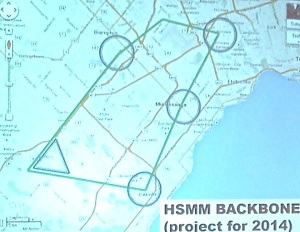
HSMM stands for high-speed multi-media. Found on the Amateur micro-wave frequencies that parallel commercial WiFi channels, it allows licensed Amateur Radio operators to create their own private, high power (we’re talking milliwatts to maybe a Watt or two), flexible, resilient, ad hoc Internet.
Here’s a link to his slides
And we’re not talking theory here. Thanks to John, VA3BL our technical director and his team the Oakville Club’s MESH link went on the air earlier this week.
So what is HSMM MESH (and forgive me if I get this wrong)?

HSMM stands for high-speed multi-media. Found on the Amateur micro-wave frequencies that parallel commercial WiFi channels, it allows licensed Amateur Radio operators to create their own private, high power (we’re talking milliwatts to maybe a Watt or two), flexible, resilient, ad hoc Internet.
Operating a SharkRF Openspot over a MESH Network
Operating a SharkRF Openspot over a MESH Network
Operating a SharkRF Openspot over a MESH Network:
Today Darryl, K5DLQ, and I connect our MESH nodes together over an internet tunnel (this simulates a true over-the-air MESH network connection that isn’t possible due to the distance that Darryl and I are from each other) and connect our SharkRF Openspot devices together, then perform a short QSO.
The SharkRF Openspot has been one of the most popular DV hotspots, allowing connection into the DMR, DSTAR and YSF networks. Today Darryl and I setup the SharkRF Server/Client option in the Openspot menu, then we use our DMR radios to communicate through each of our Openspot units (his being a server, and mine being a client which connects to his IP on the MESH network).
This can be a great tool for using MESH networking to allow connection of non-MESH devices onto the network.
Operating a SharkRF Openspot over a MESH Network:
Today Darryl, K5DLQ, and I connect our MESH nodes together over an internet tunnel (this simulates a true over-the-air MESH network connection that isn’t possible due to the distance that Darryl and I are from each other) and connect our SharkRF Openspot devices together, then perform a short QSO.
The SharkRF Openspot has been one of the most popular DV hotspots, allowing connection into the DMR, DSTAR and YSF networks. Today Darryl and I setup the SharkRF Server/Client option in the Openspot menu, then we use our DMR radios to communicate through each of our Openspot units (his being a server, and mine being a client which connects to his IP on the MESH network).
This can be a great tool for using MESH networking to allow connection of non-MESH devices onto the network.
Subscribe to:
Comments (Atom)